Fixing EPG Time Offset Wrong in TiviMate

Quick answer
When using TiviMate, a popular IPTV player, you might notice that the Electronic Program Guide (EPG) shows program times that do not correspond with your local time. This typically indicates that the EPG time offset setting is incorrect. The EPG time offset alters the displaye...
Reviewed Against
• TiviMate playlist, EPG, and player-setting workflows
• XMLTV guide imports, refresh timing, and channel-guide matching
• Server-URL formatting, HTTP response handling, and account-entry failure patterns
Applies To
• TiviMate setups on Android TV, Google TV, or Fire OS style streaming devices
• Guide data issues such as missing listings, stale guide refreshes, or wrong time offsets
• Errors caused by malformed URLs, wrong credentials, expired tokens, or unreachable playlist endpoints
Does not apply when
• Your app uses a different menu layout or naming scheme than TiviMate.
• The stream itself will not play at all and you still need to verify login or playlist access.
• The provider confirms the service is down or the account has been deliberately blocked upstream.
Corroborating Resources
XMLTV file format referenceUseful when the issue comes from guide-source formatting, channel mapping, or XMLTV data freshness.
HTTP response status codesUseful when an IPTV app surfaces 401, 403, 404, or 5xx style errors during login or playlist refreshes.
URL structure referenceHelpful for checking server URLs, source links, and path/query mistakes in portal or playlist setups.
Topic Cluster
Part of the EPG cluster
Guide data problems, XMLTV and playlist matching, time-offset fixes, and TiviMate EPG recovery paths. This page sits in troubleshoot and fix for that topic path.
Start here in this topic
On this page
Fixing EPG Time Offset Wrong in TiviMate
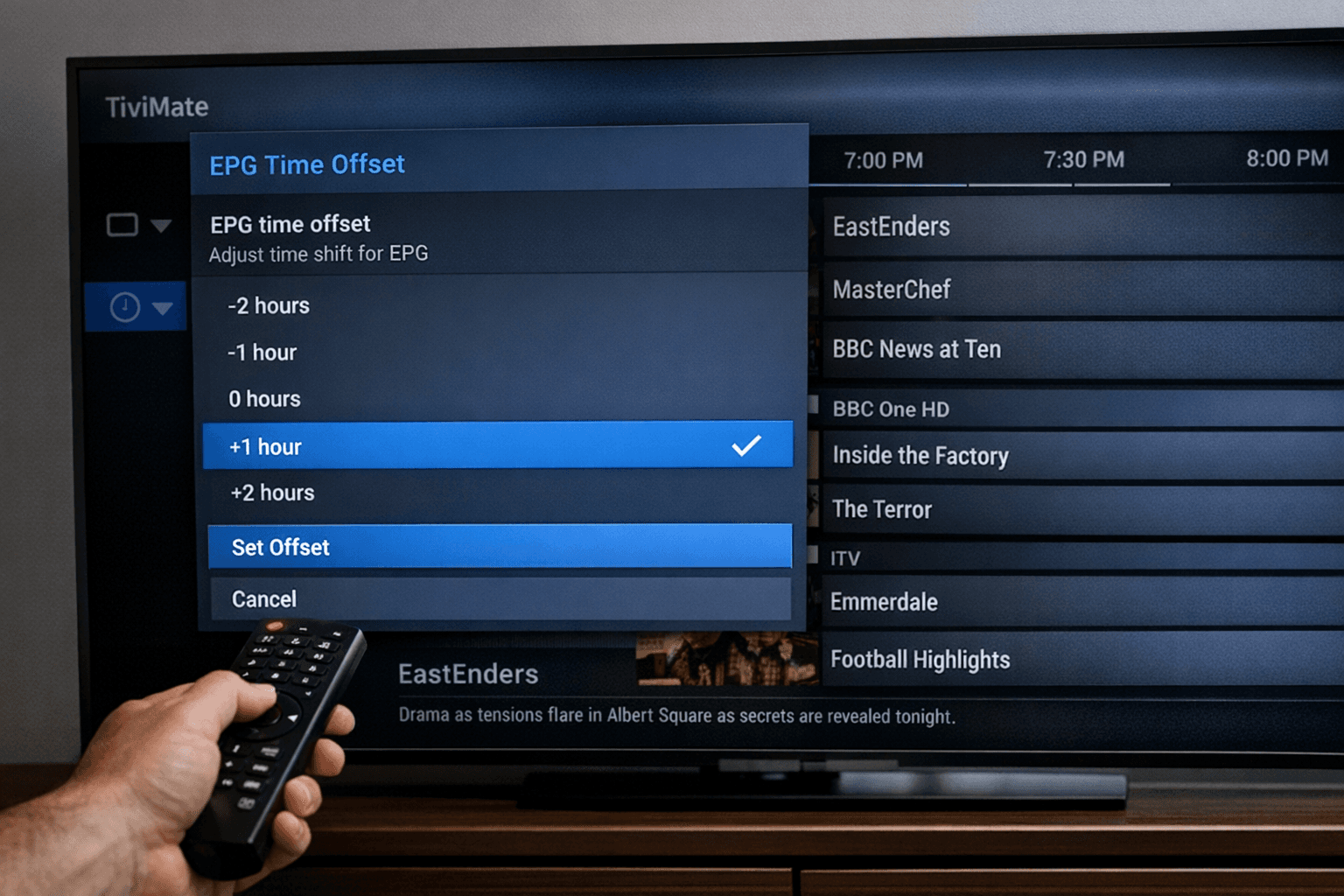
When using TiviMate, a popular IPTV player, you might notice that the Electronic Program Guide (EPG) shows program times that do not correspond with your local time. This typically indicates that the EPG time offset setting is incorrect. The EPG time offset alters the displayed program guide times to match your device's local time zone if the EPG source’s time is different. Correcting this offset ensures the program listings align with actual broadcast times.
What you'll learn
- What causes EPG time offset errors in TiviMate
- How to find and adjust the EPG time offset setting
- Troubleshooting common issues related to EPG time mismatches
- How device time and timezone impact the EPG guide
- When to seek alternative solutions or device-specific help
Understanding EPG Time Offset in TiviMate
Electronic Program Guide (EPG) is metadata sent with IPTV streams or from separate sources that lists upcoming shows, start and end times, and descriptions. Because EPG data originates from different providers around the world, program times can be relative to their own timezones. If this data isn't matched correctly to your local time, the guide will appear offset, showing programs too early or too late.
TiviMate includes an EPG time offset setting that lets you adjust this difference manually by shifting all guide times forward or backward by a configurable number of minutes or hours.
Why does the time mismatch happen?
- EPG source URL provides schedule times in a different timezone than your location.
- Your device timezone setting does not match the expected time
- EPG updates are delayed or out-of-sync with the real broadcast schedule
- The app imports outdated or cached EPG data
How to Adjust the EPG Time Offset in TiviMate
Adjusting this setting is the simplest way to fix the problem when the guide is consistently off by a fixed interval.
Step-by-step adjustment
- Open TiviMate on your device.
- From the main screen, go to the Settings menu (usually accessible from the sidebar or by pressing the menu button).
- Navigate to EPG Settings or Guide Settings (the exact name can vary by version).
- Locate the field labeled EPG Time Offset, Time Shift, or similar.
- Enter a positive or negative number representing hours (or minutes in some versions) to shift the entire guide forward or backward.
- Save your settings.
- Perform a manual refresh of the EPG data by choosing Update Guide or Refresh EPG.
- Check if the program times now align properly with your local broadcast schedule.
Note: The correct offset depends on your timezone and the timezone of your EPG source. For example, if your EPG is two hours ahead, set offset to -2 hours.
Troubleshooting Common EPG Time Offset Issues
Sometimes adjusting the offset does not fully solve the problem or introduces new ones.
- Offset keeps resetting: Ensure your app version is up to date as bugs can cause settings not to save.
- Partial times corrected: The EPG data may have multiple timezones or inconsistent entries; verify your source URL is intended for your region.
- Guide times change but streaming starts at wrong time: Remember offset only affects display times, not actual stream timing. Sync issues may come from your playlist or source.
Checking device time and timezone
If your device's system time or timezone setting is incorrect, it can interfere with proper guide display:
- Go to device Settings > Date & Time.
- Confirm the time and timezone are accurate and that automatic network time is enabled if possible.
- Restart TiviMate after correcting device time.
If you use a VPN or proxy that changes perceived location, it might also affect the app’s interpretation of time zones.
Tips for Choosing and Maintaining Your EPG Source
EPG discrepancies can often be traced to the source providing the metadata:
- Use an EPG source compatible with your channel lineup and region.
- Pick providers that clearly specify timezone info and update frequency.
- Refer to community resources, forums, or platform FAQs for recommended EPG URLs for your IPTV provider.
- Update your playlist frequently and clear EPG cache in TiviMate to avoid stale data.
When This Guidance Applies and When to Look Elsewhere
This article applies specifically to:
- TiviMate IPTV app users facing time mismatch in the program guide.
- Users who fetch EPG from external URLs or playlists with embedded EPG data.
You might want a different guide if:
- You use a different IPTV player with its own EPG management system (like IPTV Smarters or Perfect Player).
- The issue is with channel playback, buffering, or authentication, which requires a separate troubleshooting approach.
- Your device runs custom firmware or lacks standard Android time settings (e.g., some firestick forks).
FAQ
What does EPG time offset mean in TiviMate?
It's a manual adjustment that shifts the displayed guide times to align EPG data with your local broadcast times.
Why is my EPG time offset wrong?
Because the EPG source may use a different timezone or there's a mismatch between your device time and the EPG data.
Can I fix EPG offset without changing app settings?
Sometimes by switching to a more accurate or local EPG source or correcting device time, but manual offset adjustment is usually necessary.
Does changing EPG time offset affect streaming?
No, it only modifies the guide display times, not the actual video stream.
Conclusion
Incorrect EPG time offset in TiviMate is a common but resolvable issue. By understanding what offset does, adjusting it manually in the app's settings, verifying device timezone, and ensuring quality EPG sources, you can restore an accurate program guide that matches your IPTV streams. Always start with offset adjustment, then expand troubleshooting to device settings and EPG source quality if needed. This focused fix improves your IPTV viewing experience by providing reliable scheduling information.
| Problem | Cause | Recommended Fix |
|---|---|---|
| Guide times too early | EPG source ahead timezone | Set negative offset to delay EPG |
| Guide times too late | EPG source behind timezone | Set positive offset to advance EPG |
| Offset resets after exit | App bug/outdated version | Update TiviMate app |
| Partial guide correct | Mixed EPG sources/timezones | Use a single, proper EPG source |
For further issues like EPG source URL failures or missing channel logos, see our internal resources:
- TiviMate EPG Source URL Not Working: Causes, Fixes, and Troubleshoot
- Fix Missing Channel Logos in TiviMate
Or compare device suitability for TiviMate with:
If you find yourself facing playlist update issues:
Keep exploring
More explainers that connect naturally to this setup, workflow, or troubleshooting path.
If your TiviMate playlist isn't updating after you press refresh, it usually indicates issues with the playlist source, connectivity, or app functionality.

When watching IPTV on your Firestick, the speed and reliability of how your device connects to IPTV servers greatly affect stream quality.