
EPG Time Offset Wrong in TiviMate: How to Fix Guide Timing Errors

Quick answer
If you notice that your electronic program guide (EPG) in TiviMate is showing incorrect times—such as program listings starting too early or late compared to the actual broadcast—this is due to an EPG time offset problem. Essentially, the scheduling data does not align with yo...
Reviewed Against
• TiviMate playlist, EPG, and player-setting workflows
• XMLTV guide imports, refresh timing, and channel-guide matching
• Server-URL formatting, HTTP response handling, and account-entry failure patterns
Applies To
• TiviMate setups on Android TV, Google TV, or Fire OS style streaming devices
• Guide data issues such as missing listings, stale guide refreshes, or wrong time offsets
• Errors caused by malformed URLs, wrong credentials, expired tokens, or unreachable playlist endpoints
Does not apply when
• Your app uses a different menu layout or naming scheme than TiviMate.
• The stream itself will not play at all and you still need to verify login or playlist access.
• The provider confirms the service is down or the account has been deliberately blocked upstream.
Corroborating Resources
XMLTV file format referenceUseful when the issue comes from guide-source formatting, channel mapping, or XMLTV data freshness.
HTTP response status codesUseful when an IPTV app surfaces 401, 403, 404, or 5xx style errors during login or playlist refreshes.
URL structure referenceHelpful for checking server URLs, source links, and path/query mistakes in portal or playlist setups.
Topic Cluster
Part of the EPG cluster
Guide data problems, XMLTV and playlist matching, time-offset fixes, and TiviMate EPG recovery paths. This page sits in troubleshoot and fix for that topic path.
Start here in this topic
On this page
EPG Time Offset Wrong in TiviMate: How to Fix Guide Timing Errors
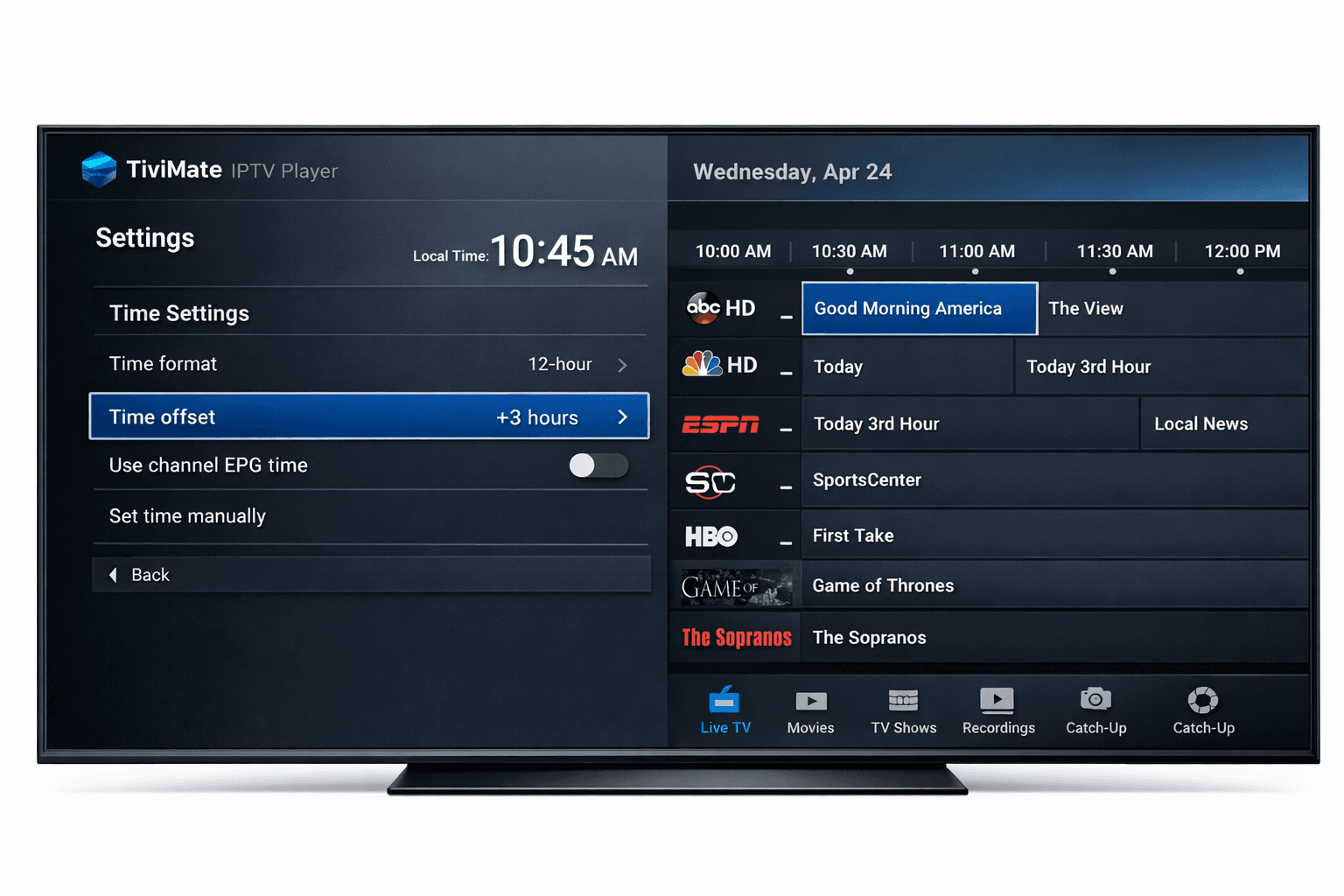
If you notice that your electronic program guide (EPG) in TiviMate is showing incorrect times—such as program listings starting too early or late compared to the actual broadcast—this is due to an EPG time offset problem. Essentially, the scheduling data does not align with your local time zone or the time coded in the EPG source.
Fixing this issue involves adjusting settings either within TiviMate or the EPG source to synchronize the guide times with your local time. Doing so ensures that program schedules, reminders, and recordings happen at the correct moments.
What you'll learn
- What causes EPG time offset mistakes in TiviMate
- How to adjust time offset in TiviMate settings
- When to change the EPG source time zone instead
- Troubleshooting common errors with guide timing
- Whom this guide applies to and when to seek device-specific help
Why Does EPG Time Offset Happen in TiviMate?
The electronic program guide data provided to TiviMate often includes scheduled start and end times in a given time zone, sometimes UTC (Coordinated Universal Time) or a region-specific zone. If this doesn't match your device's local time zone or the time zone you intended for the playlist, the guide display will be off.
Reasons include:
- The IPTV provider's EPG feed uses a different time zone than yours.
- Your TiviMate settings do not compensate for this offset.
- The playlist or EPG source URL lacks clear or correct time zone metadata.
Understanding that the offset reflects a difference between the EPG data's time base and your viewing time zone is key.
Adjusting EPG Time Offset in TiviMate
TiviMate allows users to manually set a time offset to correct this mismatch.
Steps to Fix EPG Time Offset:
- Open TiviMate on your streaming device.
- Navigate to the Settings menu from the main screen.
- Select the EPG (Guide) Settings option.
- Locate the EPG Time Offset or Time Zone Adjustment field.
- Adjust the offset value (positive or negative hours) to align with your local time. For example, if the guide runs 2 hours behind, set +2 hours.
- Save your changes.
- Refresh or reload the EPG data by navigating to the refresh option.
- Restart TiviMate if necessary to reload the guide fully.
Tips:
- Changes here only affect how the guide is presented; they don't alter your IPTV playlist.
- Offsets are usually in whole hours but can be fractional (e.g., 0.5 for 30 minutes) depending on your region.
Handling EPG Source Time Zone Settings
Some EPG XML or JSON source URLs include time zone settings or parameters.
What to check:
- Read the IPTV provider or EPG source documentation to see if they offer a way to specify your time zone in the URL or app settings.
- If so, update your source URL to include the correct time zone or offset.
- After updating, refresh the feed in TiviMate and verify the guide aligns correctly.
If your current EPG source consistently shows incorrect times and has no option to fix the offset, consider switching to a different, regionally appropriate EPG source.
Troubleshooting Common Mistakes and Errors
Common pitfalls when fixing EPG offset:
- Not refreshing EPG after changes: Always reload your EPG after adjustments.
- Ignoring daylight saving time (DST): Some regions observe DST while others don’t; check if your offset accounts for this.
- Using incorrect offset signs: Adding an offset when you should subtract can make times worse.
- Forgetting device/system time zone settings: Ensure your device’s system clock and time zone are set correctly as TiviMate relies on the device time.
How to confirm your fix:
- Compare the program start times with a trusted TV guide or another device.
- Test scheduled recordings or reminders to verify time accuracy.
Who Should Use This Guide and When to Seek Device-Specific Help
Applies to:
- Users running TiviMate IPTV Player on Android TV devices, Fire TV, Nvidia Shield, or similar platforms.
- Those using external EPG sources rather than built-in provider guides.
- Users with incorrect program times but correct system time settings.
When to choose another path:
- If you use a different IPTV app (e.g., IPTV Smarters), consult app-specific guides.
- If the system time on your device is wrong, adjust system settings first.
- For device firmware or manufacturer-related EPG issues, check device support channels.
Summary Checklist for Fixing EPG Time Offset in TiviMate
| Step | Action | Notes |
|---|---|---|
| 1 | Verify device system time zone | Must be correct first |
| 2 | Adjust TiviMate EPG time offset | In Settings > EPG |
| 3 | Refresh EPG data after changes | Reload guide thoroughly |
| 4 | Confirm offset matches local time | Use trusted TV schedules to check |
| 5 | Modify EPG source URL if needed | Check for time zone parameters |
| 6 | Restart TiviMate app | Ensures changes load properly |
Frequently Asked Questions
What causes EPG time offset to be wrong in TiviMate?
EPG time offset errors result from differences between the time zone used by your IPTV EPG feed and your device's local time zone.
Can I fix EPG time offset errors without changing my IPTV source or playlist?
Yes, adjusting the time offset in TiviMate settings often fixes timing issues without altering playlists.
Does changing the time offset affect recording schedules?
Yes; if the EPG times are off, recordings may start too early or late. Correcting the offset ensures accurate recording.
My EPG source URL shows wrong times even after offset adjustment; what should I do?
Consider switching to an alternative EPG source with accurate time data or check if the source provides adjustable time zone parameters.
Conclusion
EPG time offset errors in TiviMate are common but straightforward to fix. By adjusting the time offset setting in TiviMate or modifying your EPG source parameters, you can ensure that the program guide matches your local broadcast schedule.
Remember to verify your device system time before digging into app settings. If guide problems persist, explore alternative EPG feeds or detailed device-specific troubleshooting.
This focused approach will restore guide accuracy and improve your IPTV viewing experience.
For more detailed fixes related to TiviMate, you can explore these resources:
- TiviMate EPG Source URL Not Working: Troubleshooting Steps and Fixes
- How to Fix Channel Logos Missing in TiviMate IPTV Player
- TiviMate Playlist Not Updating After Refresh: Causes and Fixes
- Firestick VPN Causing IPTV Buffering: How to Diagnose and Fix Delays
These guides complement the steps here by tackling common related issues with EPG and playlist management in TiviMate.
Tags: IPTV, TiviMate, EPG, Time Offset, IPTV Guide, IPTV Troubleshooting, Electronic Program Guide, IPTV Player
Keep exploring
More explainers that connect naturally to this setup, workflow, or troubleshooting path.
The Fire TV Stick 4K Max supports Ethernet adapters designed to connect through its USB-C port, enabling wired internet access for more reliable streaming.

If catch-up (the ability to watch past broadcasts on demand) is not working in your TiviMate app, the issue is usually related to your IPTV playlist's support for catch-up, connection hiccups, or app configuration.

When TiviMate displays an "Xtream Codes Authorization Failed" message, it means the app cannot successfully log in to your IPTV provider’s server using the Xtream Codes credentials you entered.