How to Organize Favorites and Groups in TiviMate for IPTV

Quick answer
Organizing favorites and groups in TiviMate helps you quickly find and enjoy your preferred IPTV channels without sifting through long lists. TiviMate allows users to create custom channel groups and mark favorite channels for a streamlined viewing experience without changing...
Reviewed Against
• TiviMate playlist, EPG, and player-setting workflows
Applies To
• TiviMate setups on Android TV, Google TV, or Fire OS style streaming devices
Does not apply when
• Your app uses a different menu layout or naming scheme than TiviMate.
Topic Cluster
Part of the TiviMate cluster
TiviMate troubleshooting paths for guide loading, playlist sync issues, login failures, and setup decisions. This page sits in more in this topic for that topic path.
Start here in this topic
On this page
How to Organize Favorites and Groups in TiviMate for IPTV
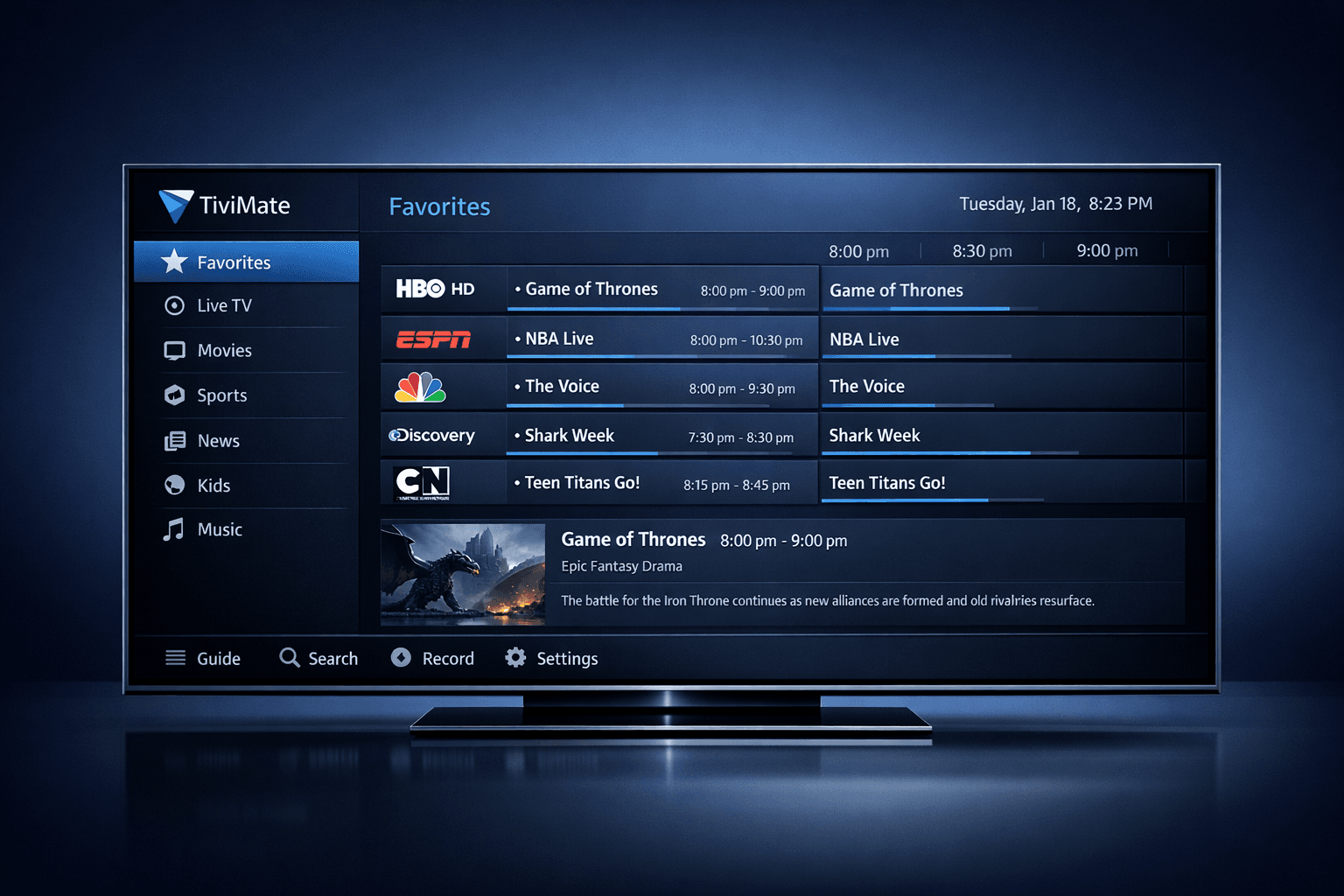
Organizing favorites and groups in TiviMate helps you quickly find and enjoy your preferred IPTV channels without sifting through long lists. TiviMate allows users to create custom channel groups and mark favorite channels for a streamlined viewing experience without changing your original playlist. This article shows you how to manage these features step-by-step, tailored to informed beginners and intermediate users.
What you'll learn
- How to create and manage custom channel groups in TiviMate
- Methods to add and organize favorite channels
- Best practices for naming and ordering groups
- Common issues and troubleshooting when groups or favorites don't save
- Which users this guide fits and when to seek alternative workflows
Understanding Channel Groups in TiviMate
In TiviMate, channel groups are custom or source-defined categories that organize channels into manageable sections. These groups help reduce clutter in your channel list and allow you to navigate based on genres, countries, or personal categorization.
Why Organize Channel Groups?
A large IPTV playlist can have hundreds of channels. Grouping them:
- Improves navigation speed
- Reduces scrolling
- Helps categorize by interest (sports, news, kids, etc.)
TiviMate supports groups imported from your playlist or manual custom groups you create.
Creating and Editing Channel Groups
You can create new groups or edit existing ones within TiviMate without altering the original playlist file. This customization stays local to your app install.
- Open TiviMate on your device.
- Navigate to the Channels section from the main menu.
- Select Manage Groups or Edit Groups.
- Choose to Add New Group or select an existing group to rename or delete.
- Assign channels to your groups by selecting channels and choosing their group from the options.
The app remembers your custom groups for all playlist sessions until you reset or clear data.
Managing Favorites in TiviMate
Besides groups, marking channels as favorites provides quick access regardless of their group. Favorites function like bookmarks.
Adding Channels to Favorites
- While viewing or scrolling your channel list, highlight a channel.
- Press the options/menu button on your remote or device.
- Select Add to Favorites.
Your favorites list becomes a separate quick filter accessible from the main navigation. This is useful for channels you watch regularly across different groups.
Organizing Favorites
In TiviMate, favorites appear in the order added by default, but you can rearrange them:
- Go to Favorites list.
- Open Manage Favorites.
- Use move up/down controls to reorder.
- Remove any channel from favorites if desired.
This prioritizes your most-watched channels at the top.
Tips for Naming and Ordering Groups
Clear and consistent group names improve navigation. Consider the following:
- Use simple, descriptive names (e.g., Sports, News, Kids)
- Avoid overly long names that might get cut off on small screens
- Keep grouping logic consistent—don’t mix unrelated channels in one group
- Order groups according to your viewing priority (e.g., Favorites or Most Watched first)
TiviMate lets you rename and reorder groups freely.
Common Mistakes and Troubleshooting
Groups or Favorites Not Saving
- Ensure you are managing groups within TiviMate and not editing your IPTV playlist externally.
- After changes, refresh your playlist in TiviMate to see updates.
- Check app permissions and storage; saving custom settings requires write access.
- Update to the latest TiviMate version for best feature support.
Channels Missing from Groups
- Verify your IPTV playlist provides group data, or manually assign channels.
- Refresh channel data if groups don't appear.
Favorites Not Showing Correctly
- Try removing and re-adding favorites.
- Restart the app.
If these steps don’t help, the issue may relate to your IPTV source or device, requiring a different troubleshooting path.
Who This Guide Applies To
This guidance is for users operating TiviMate on Android TV devices or Fire TV platforms who:
- Use IPTV playlists that support or allow grouping
- Want to create custom channel groups locally
- Seek quicker navigation via favorites
For users on other IPTV apps or devices with different interfaces, this guide will be less relevant. Also, if you manage playlists exclusively on a web portal or provider's app, different tools or instructions apply.
If your problem is about playlist updating or channel logo syncing, consult dedicated resources such as TiviMate Playlist Not Updating After Refresh or Fix Missing Channel Logos in TiviMate.
Summary Checklist for Organizing TiviMate Favorites and Groups
| Step | Description | Done |
|---|---|---|
| Access Channels Menu | Open TiviMate and go to Channels for customization | [ ] |
| Manage Groups | Create or edit groups to categorize channels | [ ] |
| Assign Channels to Groups | Select channels and add them to the groups | [ ] |
| Add to Favorites | Mark frequently watched channels as favorites | [ ] |
| Organize Favorites Order | Rearrange favorites to your viewing priority | [ ] |
Frequently Asked Questions
Can I create nested channel groups in TiviMate?
Currently, TiviMate does not support nested or subgroups within channel groups.
Does organizing groups change my IPTV playlist source?
No. Grouping in TiviMate is a local feature and does not alter the original playlist file.
How do I reset my group and favorites organization?
You can clear user settings in TiviMate app data or remove and reload the playlist, which resets groups and favorites.
Are favorites synced across devices?
Favorites are stored locally per device and are not automatically synced between different devices.
Conclusion
Organizing favorites and groups in TiviMate is a practical way to personalize IPTV viewing. By following the steps outlined here, you can create, manage, and arrange groups and favorites to reduce clutter and improve channel navigation efficiently. Remember that these customizations are local to your device and reversible, making them safe to explore and adapt to your viewing habits. Regularly updating TiviMate ensures you benefit from the latest features and fixes that improve organization management.
For further details on playlist management or channel logos, consider our related articles linked above to complement this guide.
Frequently Asked Questions
Can I create custom channel groups in TiviMate?
Yes, TiviMate allows you to create, edit, and delete custom channel groups to organize your IPTV lineup effectively.
How do I add channels to favorites in TiviMate?
While browsing channels, you can mark any channel as a favorite using the options menu, making it easier to access them later.
Will organizing groups affect my IPTV playlist?
Organizing groups and favorites is a local feature in TiviMate and does not modify the original IPTV playlist file.
What should I do if channel groups do not save correctly?
Try refreshing your playlist and ensure you have the latest TiviMate version; also verify that you are editing groups within TiviMate and not the source playlist.
Keep exploring
More explainers that connect naturally to this setup, workflow, or troubleshooting path.
If your TiviMate playlist isn't updating after you press refresh, it usually indicates issues with the playlist source, connectivity, or app functionality.

When watching IPTV on your Firestick, the speed and reliability of how your device connects to IPTV servers greatly affect stream quality.