
When Xtream Codes Works Better Than M3U for IPTV Streaming

Quick answer
When deciding between Xtream Codes and M3U for IPTV streaming, Xtream Codes often works better if you want dynamic playlist updates, integrated Electronic Program Guide (EPG), and more reliable user authentication. Unlike M3U playlists — which are static text files listing str...
Reviewed Against
• XMLTV guide imports, refresh timing, and channel-guide matching
• Xtream Codes username, password, and server-URL login flows
• M3U and M3U Plus playlist URLs, refreshes, and import behavior
Applies To
• Guide data issues such as missing listings, stale guide refreshes, or wrong time offsets
• Portal-style logins that need a server URL plus account credentials
• Playlist-based IPTV setups that rely on M3U or M3U Plus links for channel data
Does not apply when
• The stream itself will not play at all and you still need to verify login or playlist access.
• You are using only an M3U playlist URL with no Xtream-style portal login at all.
• Your app is using a portal or stalker-style workflow instead of a playlist URL.
Corroborating Resources
XMLTV file format referenceUseful when the issue comes from guide-source formatting, channel mapping, or XMLTV data freshness.
HTTP response status codesUseful when an IPTV app surfaces 401, 403, 404, or 5xx style errors during login or playlist refreshes.
URL structure referenceHelpful for checking server URLs, source links, and path/query mistakes in portal or playlist setups.
Topic Cluster
Part of the Xtream Codes cluster
Login errors, URL format confusion, authorization failures, and when Xtream Codes makes more sense than M3U. This page sits in compare options for that topic path.
Start here in this topic
On this page
When Xtream Codes Works Better Than M3U for IPTV Streaming
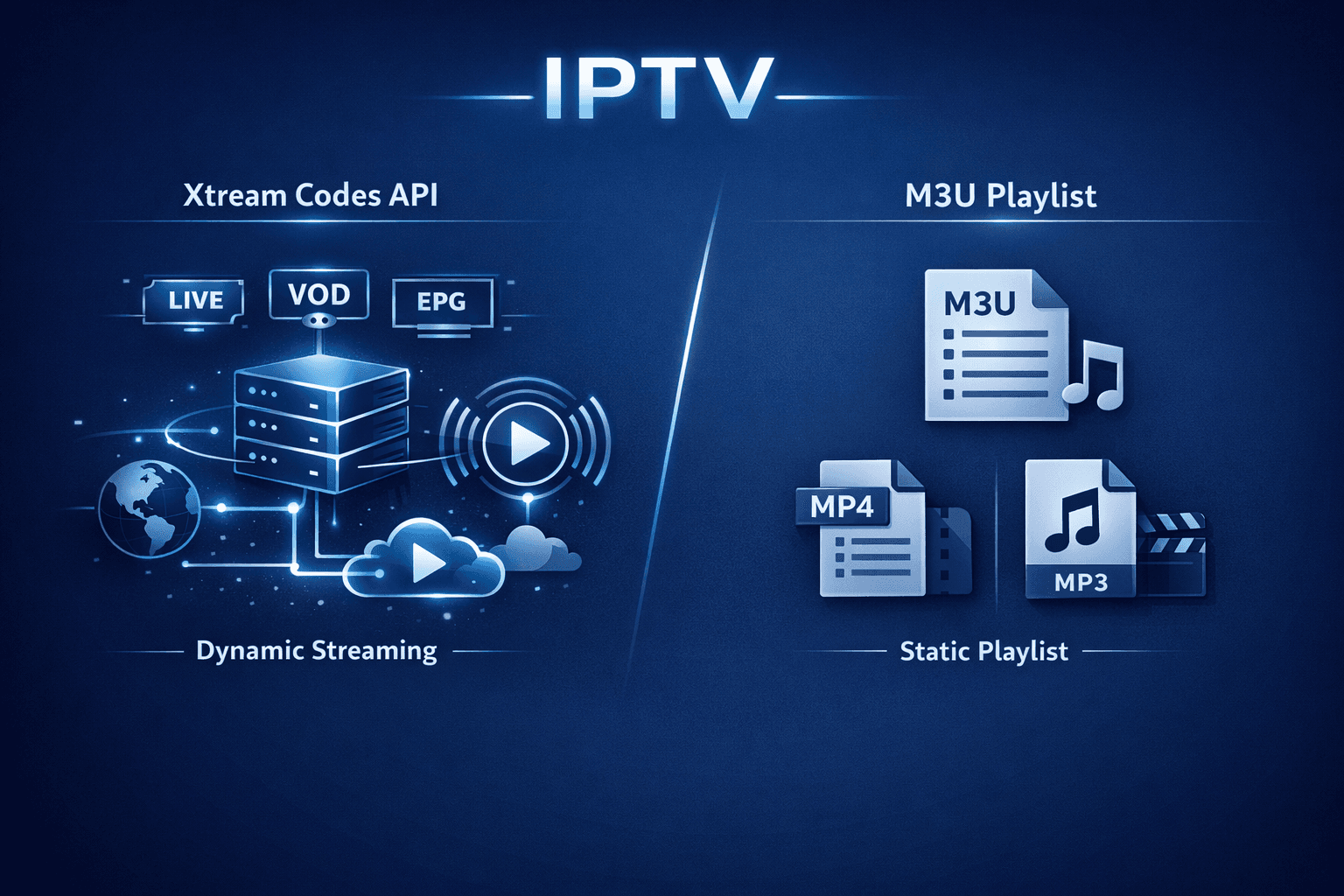
When deciding between Xtream Codes and M3U for IPTV streaming, Xtream Codes often works better if you want dynamic playlist updates, integrated Electronic Program Guide (EPG), and more reliable user authentication. Unlike M3U playlists — which are static text files listing streaming URLs — Xtream Codes uses an API-based login system that offers real-time channel management and data synchronization.
What you'll learn
- The differences between Xtream Codes and M3U playlist formats
- Why Xtream Codes can provide better reliability and updating
- How channel and EPG data management differs
- When to choose Xtream Codes over M3U
- Troubleshooting common issues with Xtream Codes logins
Understanding M3U and Xtream Codes: Basic Differences
What is an M3U playlist?
An M3U playlist is a simple text file containing URLs to media streams. IPTV apps load this playlist, parse the links, and display channels for streaming. However, M3U files are static, meaning any updates or changes require the playlist file to be manually refreshed or reloaded by the user or provider.
What is Xtream Codes?
Xtream Codes is an API-based IPTV login format originally developed as middleware to deliver IPTV content. It uses a username, password, and server URL to authenticate users and dynamically fetch channels, VOD content, and EPG data. Because data flows through an API, it updates in real time.
Why Xtream Codes Works Better Than M3U in Many Cases
| Feature | M3U Playlist | Xtream Codes API |
|---|---|---|
| Playlist Type | Static file with channel URLs | Dynamic API fetching channels, VOD, and EPG |
| Updates | Manual reload of playlist file | Automatic and real-time updates |
| EPG Integration | Often requires separate EPG file | Integrated EPG data via API |
| Authentication | No user login; link access controlled externally | Uses username and password for secure login |
| Channel/Group Management | Fixed in playlist | Automatically updated on server side |
Dynamic Updates Avoid Interruptions
Since M3U files are static, any channel change or update by the IPTV provider requires new M3U playlists to be sent or fetched, often causing downtime or outdated channel lists. Xtream Codes' dynamic API keeps channel lists, catch-up, and VOD items always up to date.
Better EPG Handling
While M3U often separates stream URLs from Electronic Program Guide (EPG) data, Xtream Codes bundles these in a single API call, allowing IPTV apps to display accurate program info seamlessly.
Stronger Authentication and Permissions
Xtream Codes verifies user credentials before streaming, enabling providers to enforce subscription permissions reliably. M3U playlists may be publicly accessible or require custom management.
Setting Up Xtream Codes Login in IPTV Apps
Popular IPTV apps like TiviMate, IPTV Smarters, or Perfect Player support Xtream Codes login alongside M3U URLs. Here's a generalized approach to switching from M3U to Xtream Codes:
- Confirm your provider offers Xtream Codes API access.
- Open your IPTV app and locate the option to add a new playlist or login.
- Choose the Xtream Codes login option.
- Enter your IPTV server URL, username, and password exactly.
- Let the app fetch your channels, VOD, and EPG automatically.
Xtream Codes typically results in faster channel updates and better EPG accuracy after setup.
Common Mistakes and Troubleshooting Xtream Codes
Mistake: Using M3U Credentials for Xtream Codes Login
Xtream Codes requires a specific user/pass/server combo, not just an M3U URL. Using an M3U link where API login is expected causes login failures.
Mistake: Entering Incorrect Server URLs
The Xtream Codes API URL is specific and must be copied exactly from the provider’s instructions. Missing https:// or typos lead to connection errors.
Troubleshooting Steps
- Double-check all login details for typos.
- Confirm your subscription is active and Xtream Codes is enabled.
- Test connection in app and look for explicit error messages (authorization errors, 404 errors).
- Restart the IPTV app and reload the playlist.
If issues persist after verifying login data, consult your provider’s support.
Who Should Use This Guidance and When to Look Elsewhere
This advice applies if:
- You have a subscription from an IPTV provider that supports Xtream Codes API logins.
- You use advanced IPTV apps compatible with both M3U and Xtream Codes.
- You want automatic updates and embedded EPG in your IPTV experience.
Use a device-specific guide if you are exclusively using hardware like MAG boxes or STBs requiring proprietary workflows. For apps without Xtream Codes support, troubleshoot M3U playlist issues instead.
If your provider only offers M3U playlists and no API support, this article won’t improve your situation.
Comparing Xtream Codes and M3U: A Checklist for IPTV Users
- Does your provider support Xtream Codes API login?
- Do you want dynamic channel and EPG updates without manual reloads?
- Do you use an IPTV app that supports multi-format logins?
- Need stronger user authentication and permission management?
- Prefer a centralized method to manage channels, VOD, and EPG?
If you answered yes to most, Xtream Codes is likely the better choice.
FAQ
What happens if my IPTV app doesn’t support Xtream Codes?
If the app lacks Xtream Codes support, you must use M3U playlists or choose a compatible app like TiviMate or IPTV Smarters.
Can Xtream Codes improve streaming speed?
While it streamlines access and updates, streaming speed mostly depends on the IPTV provider and your internet connection rather than the login method.
Is Xtream Codes still actively supported?
Xtream Codes middleware was discontinued in 2019, but many IPTV providers still use compatible APIs or rebranded versions depending on app support.
What if the channel list isn’t updating?
Try refreshing the playlist or relogging into the Xtream Codes API in your app. Check for provider outages.
Conclusion
Xtream Codes works better than M3U when you want IPTV channel lists, VOD, and EPG to update dynamically and securely via an API. By switching from static M3U playlists to Xtream Codes login in supported apps, users gain automatic synchronization and stronger authentication. However, this advantage depends largely on your IPTV provider offering Xtream Codes API access and your app supporting it. For many informed IPTV users looking to reduce manual playlist management and improve EPG integration, Xtream Codes is a smarter choice over basic M3U playlists.
Explore our related resources on M3U Plus vs Xtream Codes API for IPTV Playlist Updates and troubleshooting guides for sustained IPTV enjoyment.
Suggested internal links:
- M3U Plus vs Xtream Codes API for IPTV Playlist Updates
- IPTV Smarters Invalid Details Error: Clear Causes and Step-by-Step Fix
- TiviMate Playlist Not Updating After Refresh: Causes and Fixes
- How to Organize Favorites and Groups in TiviMate for IPTV
Keep exploring
More explainers that connect naturally to this setup, workflow, or troubleshooting path.

For IPTV users deciding between Xtream Codes format and M3U playlists, understanding when Xtream Codes works better is key. Simply put, Xtream Codes works better than M3U playlists when your IPTV service offers secure login credentials.

TiviMate is a popular IPTV player app for Android TV and similar devices, known for its advanced channel management options. Organizing favorites and groups in TiviMate lets you customize your IPTV watching experience by categorizing.

When you switch channels on your IPTV service and the screen freezes or lags, it’s frustrating and disrupts your viewing experience. IPTV freezing during channel switching is most often caused by network delays, buffering, or the IPTV.
